
Quick Reference Guide


www.gateway.com
11
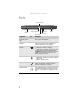
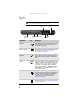
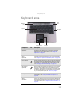
Keyboard area
Component Icon Description
Keyboard Provides all the features of a full-sized, computer
keyboard. For more information, see “Using the
keyboard” on page 24.
Multimedia
panel
(optional)
Use to control playback of CDs and DVDs. The panel
includes volume control buttons. For more information,
see “Using the optional multimedia panel” on page 31.
Power button Press to turn the power on or off. You can also configure
the power button for Sleep/Resume mode. For more
information on configuring the power button mode,
see “Changing advanced settings” on page67.
Microphone
(optional)
Record audio through this microphone or use it to talk
through when making Voice over Internet Protocol
(VoIP) calls. The built-in microphone is turned off while
an external microphone is connected. For the location
of your microphone jack, see “Front” on page 6.
Touchpad Provides all the functionality of a mouse. For more
information, see “Using the EZ Pad touchpad” on
page 28.
Status
indicators
Inform you when a drive is in use or when a button has
been pressed that affects how the keyboard is used. For
more information, see “Using the status indicators” on
page 23.
Status indicators
Power
button
Keyboard
Touchpad
Multimedia
panel
Microphone