hub/switch User Guide MG1-1000
Manuals
Brands
Gateway Manuals
Switch
MicroGate MG1-1000
9
10
11
12
13
14
15
16
17
18
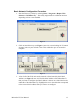
Figure 6
4.
Once the row corresponding to the u
nit to
be configured is highlighted, click
on
Edit Unit
(see
Figure 6
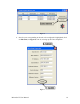
, note #1) to bring up the Unit’s Properties
Figure 7
MicroGate™ User Manual 14
1
...
...
12
13
14
15
16
17
...
18