
Owner's Manual






12
www.gateway.com
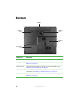
Right side
Component Icon Description
Volume
control
■
Press forward to increase the volume.
■
Press backward to decrease the volume.
■
Press in to mute the volume.
Headphone
jack
Plug amplified speakers or headphones into this jack.
The built-in speakers are turned off when speakers or
headphones are plugged into this jack.
Microphone
jack
Plug a microphone into this jack.
USB port Plug USB (Universal Serial Bus) devices (such as a
diskette drive, flash drive, printer, scanner, camera,
keyboard, or mouse) into this port.
DVD/CD-RW
or DVD-RW
drive
Insert CDs or DVDs into this drive. For more information,
see “Using the DVD drive” on page 38. This drive may
be a combination DVD/CD-RW or DVD-RW drive. To
determine the type of drive in the notebook, examine the
drive tray’s plastic cover and compare the logo to those
listed in “Identifying drive types” on page 38.
DVD/CD-RW or
DVD-RW drive
Power connector
Microphone jack
Headphone jack
USB portVolume control