
Quick Start Manual


Table Of Contents
- English
- Français
- Español
- Encendido de la computadora
- Principios básicos de la computadora
- Conocimiento de la computadora
- Actualización de la computadora
- Fuente de alimentación
- Software
- Uso de Windows y el Software
- Centro de bienvenida
- Oferta de seguridad para Internet
- Gateway Recovery Management de
- Gateway My Backup
- Reproducción de archivos multimedia
- Reproducción automática
- Reproducción de archivos descargados
- Reproducción de películas en DVD
- Reproducción de películas Blu-ray
- Dolby Home Theater (opcional)
- Redes sociales (opcional)
- Uso de Windows y el Software
- Internet
- Centro de asistencia técnica
- Recuperación
- Información reglamentaria
- Medioambiente
- Licencia de Software
- Índice
- Português
- 日本語
- 繁體中文
- 简体中文
- Bahasa Indonesia
- ไทย
18
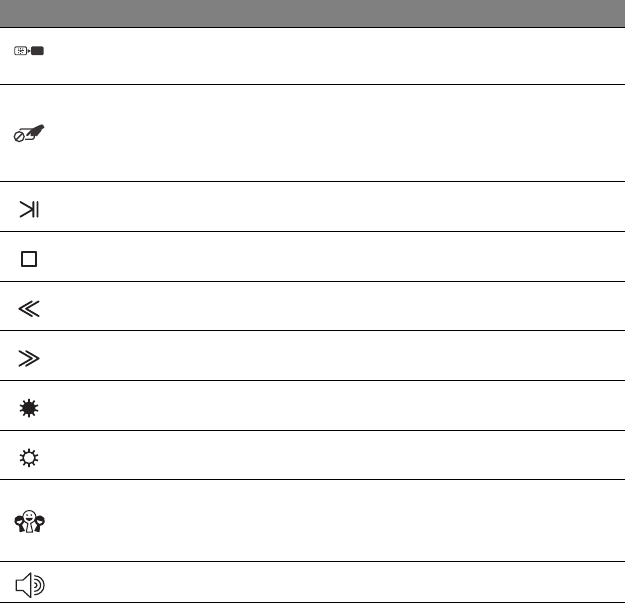
Screen blank
Turns the display screen backlight off to save power.
Press any key to return.
Touchpad Lock
The Touchpad Lock button toggles the touchpad on or
off to avoid unwanted pointer movements when using
the keyboard. This is most useful if you have connected
a mouse to your computer.
Play/Pause Play or pause a selected media file.
Stop Stop playing the selected media file.
Previous Return to the previous media file.
Next Jump to the next media file.
Brightness down Decreases the screen brightness.
Brightness up Increases the screen brightness.
Social Networks
Opens the Social Networks application.
- If this application is not installed, the key will start
your instant messaging application.
Volume up Increases the sound volume.
Icon Function Description