
Quick Reference Guide





www.gateway.com
9
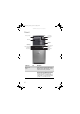
Monitor (VGA) port Plug a VGA (blue connector) monitor cable
into this port.
IEEE 1394/
FireWire™ port
Plug IEEE 1394 (also known as Firewire
™
)
devices (such as a digital camcorder) into
this 6-pin IEEE 1394 port. For more
information, see “Installing a printer,
scanner, or other device” on page 28.
USB ports Plug USB (Universal Serial Bus) devices
(such as a USB Iomega™ Zip™ drive,
printer, scanner, camera, keyboard, or
mouse) into these ports. For more
information, see “Installing a printer,
scanner, or other device” on page 28.
S/PDIF output jack
(optional)
Plug an optical cable from an amplifier or
entertainment system into this jack for
digital sound.
Microphone jack
(pink plug)
Plug a microphone into this jack.
Headphone/analog
speakers jack (green
plug)
-OR-
Front speakers jack
This jack is user configurable for one of the
following:
Headphone: Plug headphones or amplified
speakers into this jack (Default).
Stereo out: Plug your front left and right
speakers into this jack.
For more information, see “Configuring the
audio jacks” on page 27.
TV tuner (optional) Plug a video tuner or antenna into this
optional jack.
Wireless network
antenna (optional)
and connectors
Connect this antenna to your wireless
network antenna card (optional).
Case thumbscrew Remove this screw before opening the
case.
PS/2 mouse port Plug a PS/2 mouse into this port.
Parallel port Plug a parallel device (such as a printer)
into this port.
Component Icon Description
8512041.book Page 9 Friday, December 15, 2006 5:08 PM