
Quick Reference Guide





CHAPTER 2: Checking Out Your Computer
6
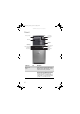
Front
Component Icon Description
Memory card
reader
Insert a memory card from a digital camera,
MP3 player, PDA, cellular telephone, or other
device into the memory card reader.
DVD/CD drive Use this drive to listen to audio CDs, install
games and programs, watch DVDs, and store
large files onto recordable discs (depending
on drive type). This drive may be a CD,
recordable CD, DVD, recordable DVD, Blu-ray,
or HD DVD drive. For more information about
your drive, see the online User Guide.
Memory card reader
DVD/CD drive
Microphone jack
Power button/
power indicator
DVD/CD drive
(optional)
Headphone jack
IEEE 1394/
FireWire™ port
USB ports
Video jack (optional)
Audio left jack
(optional)
Audio right jack
(optional)
Diskette drive (optional)
8512041.book Page 6 Friday, December 15, 2006 5:08 PM