
Guide





Updating Layers Maintained in Another GIS
Contact DeLorme Professional Sales for support: 1-800-293-2389 Page 99
Managing Subscription Layers for Database Users
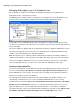
Once a database is enabled for subscriptions, the Working view appears to the right when the
Subscriptions item is selected in the tree menu.
The Working View is comprised of three components; a list of database users and the database roles
(left), a list of layers in the database (right), and a Create Subscription File button (bottom).
To subscribe a user(s) or Windows Group (only security groups are supported at this time) to a layer,
select the user(s) in the list on the left and select the check box next to each layer to subscribe them to in
the list on the right.
This layer assignment is dynamic and can be changed at any time by a database administrator or owner.
The actual subscription file, when created, does not contain this layer assignment information; it only
contains connection information to the subscription database.
Note: The RedLine Layer is a GIS layer that is automatically created when an Enterprise database is
enabled for subscriptions. It is the repository for all redlines draw layers and serves as the GIS change
reference for a database administrator. There is no need to include it as part of a user’s subscription
unless it is important for them to see where other users have been making their redline edits.
Creating a Subscription File
To create a subscription file, click the button at the bottom of the Working View and name and save the
file. For record keeping, it is good practice to name the subscription file after its database rather
than an individual user or list of layers, since the file does not contain specific information related to a
particular user or group of layers in the database.
The subscription file contains information about the master database (the database that the user is
subscribed to), and indicates the user’s version of XMap and which database to sync too when
synchronization is performed. It does not record information about which layers in the subscription
database users are subscribed to, and it does not contain information about specific users’ access
rights and database roles, unless the SQL authentication method is used, in which case individual
subscription files will need to be created and manually configured for each SQL account (SQL accounts
for database subscriptions and synchronization are not recommended for this reason).