
Guide





Database Administration Using Database Manager
Contact DeLorme Professional Sales for support: 1-800-293-2389 Page 96
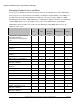
Enable/Disable a layer for check-
outs
X X
Add users to a database X
Change database user roles X
Drop (delete) databases X
* Indicates that XMap Enterprise is required to create an Enterprise Database in order for this feature to
function.
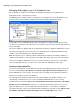
To add a database user, expand the database's menu in the tree view and then point to the Database
Users option underneath it. Right-click and select Add User.
In the Add Users dialog select the server user you want to add to the database user list and click OK.
To modify a user’s database role from the default, expand the database list in the tree-view, click
Database Users, then double-click in the Database Role column in the Working View to the right.
To remove a user from a database, right-click the user in the Working View to the right and select
Remove User.
Backing up and Restoring Databases
You can back up a local database to a secure location and restore database backups at a later date using
the Backup/Restore feature in Database Manager. Network databases are not currently supported for
backup/restore in Database Manager.
It is strongly recommended that the location of the back up file be different than the hard drive of the
computer where the source database resides in case of hard drive failure.