
Guide





Database Administration Using Database Manager
Contact DeLorme Professional Sales for support: 1-800-293-2389 Page 95
Managing Database Users and Roles
A Server User or Database Creator must be given permissions for a database by a Server Administrator
before they can access the GIS layers in the database in XMap. The default database role is XMap User.
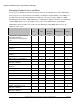
The table below shows the functionality that is available for each of the role types; XMap User, XMap
Edit, XMap Checkout Creator, XMap Administrator, or XMap Owner. Database Creators are automatically
assigned XMap Owner roles on the databases they create. Server Administrators (and Computer
Administrators where the SQL server resides) are automatically assigned XMap Owner roles on all
databases on the server.
Feature XMap
User
XMap
Edit
XMap
Checkout
Creator
XMap
Administrator
XMap
Owner
View GIS layers and associated
information (attributes,
classifications, layer properties,
etc.)
X X X X X
Run queries X X X X X
Export layers X X X X X
Subscribe to an Enterprise
database
X X X X X
Create redlines X X X X X
Synchronize to an Enterprise
database
X X X X X
Create queries X X X X
Edit geometries and attributes X X X X
Create check-outs from an
Enterprise database
X X X
Save check-outs on an existing
database
X X X
Import layers X X
Delete layers X X
Add/delete attribute fields X X
Import/link attribute sets X X
Edit layer properties X X
Create classifications X X
Save classification templates X X
Enable subscriptions on an
Enterprise database*
X X
Create subscriptions on an
Enterprise database*
X X