
Guide





Database Administration Using Database Manager
Contact DeLorme Professional Sales for support: 1-800-293-2389 Page 94
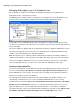
In the Add Server Account dialog, type the user’s name in the User Name box and the select the type of
authentication method to use. If you choose Windows Authentication, the user name must match the user
name on the network domain. If you choose SQL Server Authentication, create the name and password
for the new user. The user will need the password to access the GIS layers in the database from within
XMap. Click OK.
Note: A user must be added to the SQL server user list before they can be given access to databases on
that SQL server.
To modify a user’s server role from the default, expand the server list in the tree-view and select Server
Users, then double-click in the System Role column in the Working View to the right.
To remove a server user, right-click the user in the Working View to the right and click Delete User.