
Guide




Distributing a Patch using SMS
Contact DeLorme Professional Sales for support: 1-800-293-2389 Page 67
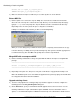
a) Click the General tab and change the command line to:
msiexec /fvomus “<msi name>” /qn
Replace <msi name> with the MSI that you selected in step 4.a
. For example, your command line
should look something like:
msiexec /fvomus “DeLorme XMap 7.msi” /qn
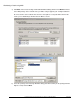
b) Click OK to close the Program Properties dialog.