
Guide

Distributing a Patch using SMS
Contact DeLorme Professional Sales for support: 1-800-293-2389 Page 59
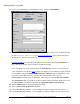
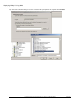
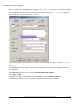
For the command line, click Browse and navigate to the update.exe file. Make sure to navigate through
the network path to the file and not a local path. After add in the following /s /v”/qn” for a completely
quiet install. Note the space between the /s and /v.
If you want to display a basic progress bar to let the user know when the update is complete, use /qb in
place of /qn.
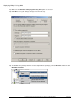
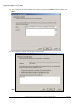
Click Advanced. Select the option to Run another program first and point it to the original deployment of
the application.
Click Environment and select the option to Run with Administrative Rights.
Click Apply and OK.
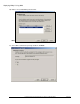
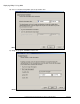
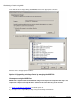
Right-click the newly created program, point to All Tasks, and click Distribute Software.
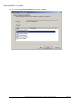
Click Next in the wizard, select the appropriate distribution point, and then click Next.