
Guide





Deploying XMap 7 Using SMS
Contact DeLorme Professional Sales for support: 1-800-293-2389 Page 46
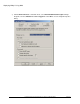
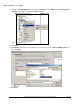
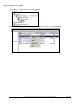
a) Click the Schedule tab and add new schedule items or edit existing schedule items to suit your
needs. For example, we generally change the existing schedule to occur every 30 minutes to test
our setups, and you may want to do the same when you first deploy to test your distribution on
one or two computers, then change it back to a daily or weekly cycle once you get everything
working. If your client computers do not have Windows Installer 4.5 installed, then you will
probably want to schedule this to run every 30 minutes when you first deploy the package to the
network. This will force the package to run multiple times which will be required to install SQL
Server after the reboot from installing Windows Installer 4.5. Once the package has successfully
deployed to all your clients, then you can either remove it, or reschedule it to only run once in a
while.