
Guide


Distributing a Patch using Active Directory GPO
Contact DeLorme Professional Sales for support: 1-800-293-2389 Page 32
Distributing a Patch using Active Directory GPO
Active Directory GPO does not allow native distribution of update.exe or its embedded MSP, Microsoft
patch, file. The following steps will allow an administrator to use the embedded .msp file to patch the
original MSI. Once the original MSI is patched, then it is possible to redeploy the MSI as an upgrade.
Uncompress original MSI files
Uncompress the original MSI package using the following command line:
msiexec.exe /a “<path_to_original_msi>”
TARGETDIR=”<path_to_uncompressed_MSI>”.
Make sure that the uncompressed directory is accessible by all users on the domain.
Extract MSP file
Run the update.exe to extract the .msp file. XMap does not need to be installed on the machine where
this runs. The msp file is extracted to the temp directory. Depending on the size of the patch, this process
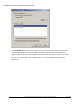
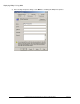
may take a few minutes. If XMap is not installed on the machine you will see the following dialog:
When you see this dialog then you will know that the patch is completely extracted and safe to copy to
another directory. You can find the temp directory by typing in %temp% at the run prompt. The .msp file
will be located in a new folder in this directory. For XMap the msp is labeled xmap.msp. After you have
finished copying the file to a different directory, click OK on the prompt above and the setup will abort.
Merge MSP with uncompressed MSI
Run the following command line to merge the patch MSP file with the uncompressed original MSI
package.
msiexec /a “<path_to_uncompressed_MSI>” /p “<path_to_MSP_file>”
Depending on the patch size, this process may take a few minutes.