
Guide



Introduction
Contact DeLorme Professional Sales for support: 1-800-293-2389 Page 20
b) Make sure that you are in the directory that contains the RunPrerequisites.vbs script, or the path
to the script is in your system path, or that you provide the full path to the local copy of the
RunPrerequisites.vbs script on the command line.
c) Also make sure that you provide the /no_sql_server switch if you used that option for
installing the prerequisites:
cscript RunPrerequisites.vbs /installPath:<network path to
Prerequisites installer> /computer:<client computer name>
[/no_sql_server]
E.g. cscript RunPrerequisites.vbs
/installPath:“\\someserver\path_to_installer\Setup.exe”
/computer:someclient
d) NOTE: This command or some of the steps following this command may produce an error that
outputs text to the command window that is similar to the following:
There was a problem connecting to machine_name\root\default:StdRegProv
Error 462 The remote server machine does not exist or is unavailable.
If you see this error text it can be caused by one of two things:
i) The client computer or the firewall that the client is behind is blocking the port for the remote
registry service. If this is the case, enable the port for the remote registry service if your
security policy allows this, or, go to the client computer to physically verify that the
prerequisites have completed installing by viewing the processes that are running to ensure
that the Prerequisites process is not running. You can use the task manager or pslist if
available on the client, to view the processes.
ii) The remote registry service is not running on the client computer. If this is the case, then you
can run the following command to enable the remote registry service on the client computer:
psexec \\<client computer> net start RemoteRegistry
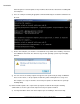
22) The RunPrerequisites.vbs script will set the ERRORLEVEL variable to 0 if the prerequisites are
installed or 1 if the prerequisites are not installed. Enter echo %ERRORLEVEL% at the command
line to see the results of running the script. Below is an example of calling the command for a
computer that does not have all of the prerequisites
installed.