
Guide





Updating Layers Maintained in Another GIS
Contact DeLorme Professional Sales for support: 1-800-293-2389 Page 100
For a detailed look at the contents of a subscription file, you can open it in a text editor like Notepad. The
file contains comments on the different parameters it uses, which can be configured by the user if
desired.
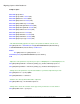
The subscription file parameters are:
MasterDB-Server=
MasterDB-Database=
(Specify the master database name and server. These are typically the only settings required for
synchronization using NTML credentials).
MasterDB-Login=
MasterDB-Password=
(Specify the SQL login and password credentials. Only needed for SQL accounts).
LocalInstanceName=
(Specifies the local database instance to be used during the creation of the local sync database. XMap
automatically searches for this name during the initial synchronization on a user’s computer. If the
SyncDB- parameters below are filled in, this is ignored).
SyncDB-Server=
SyncDB-Database=
(Specify the server and database to use as the local subscription database. Only needed if the default
local sync database automatically created on first run of the sync process should be bypassed).
SyncDB-Login=
SyncDB-Password=
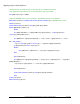
(Specify the SQL login and password credentials of the sync database. Only needed for SQL accounts
when the default sync database should be bypassed. To get the encrypted password for the SQL
account, connect to the DB within XMap and then copy the password out of the registry into
thesubscription file opened in a text editor. You can find the registry key here -
HKEY_CURRENT_USER\Software\DeLorme\XMAP7\DeLormeComponents\DeLorme.XMap7.Layers_Co
mponent.1\OpenSpaceServers).
BatchSize=
(Specifies the batch size to use during syncing. The default is 2000. The batch size is the number of
geometries to process at a time. The smaller the batch size, the more iterations of the synchronization will
be performed).
SyncLogSizeKBytes=
(Species the maximum sync log file size, in bytes. The default is 10. This file records all the operations
that the synchronization engine performs. It is automatically stored in the XMap program directory.)