
Guide



Introduction
Contact DeLorme Professional Sales for support: 1-800-293-2389 Page 10
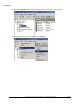
f) Click the Members tab on the Properties dialog and click the Add button.
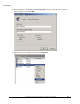
g) Click Object Types and select Computers so it is one of the types you can add. Type the list of
computer names using semi-colons to separate them in the Enter the object names to select
box and click OK.
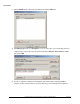
h) The list of computers is displayed in the Members tab of the Properties dialog. Click OK to
complete creation of the group. Close the Active Directory Users and Computers program; the