
Cockpit Reference Guide



Garmin G1000 Cockpit Reference Guide for the Beechcraft 300/B300 Series
190-01344-01 Rev. A
Appendix
123
Flight
Instruments
Nav/Com/
XPDR/Audio AFCS GPS Nav
Flight
Planning Procedures
Hazard
Avoidance
Additional
Features Annun/Alerts Appendix Index
Message Comments
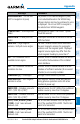
NON WGS84 WPT
– Do not use
GPS for navigation to [xxxx]
The position of the selected waypoint [xxxx]
is not calculated based on the WGS84 map
reference datum and may be positioned in error
as displayed. Do not use GPS to navigate to
the selected non-WGS84 waypoint.
STRMSCP FAIL
– Stormscope has
failed.
Stormscope has failed. The G1000
™
system
should be serviced.
FAILED PATH
– A data path has
failed.
A data path connected to the GDU or the GIA
63/W has failed.
MAG VAR
– Large magnetic
variance. Verify all course angles.
The GDU’s internal model cannot determine
the exact magnetic variance for geographic
locations near the magnetic poles. Displayed
magnetic course angles may differ from the
actual magnetic heading by more than 2°.
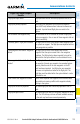
SVT
– SVT DISABLED: Out of
available terrain region.
Synthetic Vision is disabled because the aircraft
is not within the boundaries of the installed
terrain database.
SVT
– SVT DISABLED: Terrain DB
resolution too low.
Synthetic Vision is disabled because a terrain
database of sufficient resolution (9 arc-second
or better) is not currently installed.
SCHEDULER [#]
– <message>. Message criteria entered by the user.
USER MAG VAR
– User magnetic
variation is active.
User magnetic variation mode was selected
during previous operation and is still active
(checked at power-up.)
CHECK CRS
– Database course for
LOC1 / [LOC ID] is [CRS]°.
Selected course for LOC1 differs from published
localizer course by more than 10 degrees.
CHECK CRS
– Database course for
LOC2 / [LOC ID] is [CRS]°.
Selected course for LOC2 differs from published
localizer course by more than 10 degrees.
[PFD1, PFD2, or MFD1]
CARD
1 REM
– Card 1 was removed.
Reinsert card.
The SD card was removed from the top card
slot of the specified PFD or MFD. The SD card
needs to be reinserted.
[PFD1, PFD2, or MFD1]
CARD
2 REM
– Card 2 was removed.
Reinsert card.
The SD card was removed from the bottom card
slot of the specified PFD or MFD. The SD card
needs to be reinserted.