
Instruction Manual




G1000 / GFC 700 System Maintenance Manual - 300/B300 Series King Air Page 3-5
190-00716-01 Revision 3
3.5 G1000 Normal Mode
To start the G1000 system in Normal Mode:
1. With a ground power unit connected to the external power receptacle, set the BAT and EXT PWR
switches to ‘ON’. The following G1000 equipment is powered:
• PFD displays & MFD display
• GRS 77 AHRS Units
• GDC 7400 Air Data Computers
• GIA 63W Integrated Avionics Units
• GEA 71 Engine/Airframe Units
• GCU 477 FMS Control Unit
• GMC 710 Autopilot Control Unit
• GSA Servos
• GMA 1347D Digital Audio Panel #1
• GSD 41 Data Concentrator (Optional)
2. Set the AVIONICS MASTER switch to ‘ON’. The following G1000 equipment is powered:
• GMA 1347D Digital Audio Panel #2
• GDL 69A Datalink Unit
• GWX 68 Weather Radar Unit
• GTS 8XX Traffic System (Optional)
• GTX 33 Mode S Transponders (Optional)
• GDL 59 / GSR 56 Wi-Fi/Satellite (Optional)
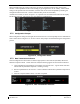
The G1000 system is now powered in the normal mode. In the normal operating mode, data fields that
are invalid have large red X’s through them. A valid field does not display a red X. Allow the displays
to initialize for approximately one minute. The GDC 7400s require a longer initialization period than do
the other LRUs. During normal operation, this causes the airspeed, altitude, vertical speed, and OAT
fields to be invalid during the first ~40-60 seconds of PFD power-up
. The PFDs and MFD will function
as specified in the G1000 300/B300 Series Cockpit Reference Guide when the system has been correctly
installed and configured.
Figure 3-7, Normal Mode