
System Maintenance Manual







G1000 / GFC 700 System Maintenance Manual - 300/B300 Series King Air Page 3-49
190-00716-01 Revision 2
3.36 BLR Winglet Option (model 300 only)
Follow this procedure only if BLR Aerospace STC SA01615SE for 300/300LW series winglets is
installed on the aircraft. This option changes the airspeed indicator marking for air minimum control
speed (Vmca) to 95 KIAS.
1. With the loader card in the top slot of PFD1 and PFD1 in configuration mode, select the “System
Upload” page using the PFD1 small FMS knob.
2. Activate cursor and rotate the small FMS knob to display drop down menu. Highlight King Air -
Options and press ENT key on PFD1.
3. Rotate the small FMS knob to highlight “BLR winglet STC (model 300 only)”. Press ENT key
on PFD1.
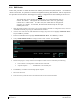
4. Verify “BLR winglet STC (model 300 only)” is displayed in the “Item” window. Press “LOAD”.
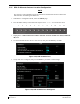
Figure 3-47, BLR winglet option (model 300 only)
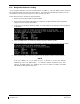
5. Monitor load progress. Verify software load completes without errors as indicated by the
following:
• Green “PASS” in Configuration column for AIRFRAME.
• “Upload Complete………….COMPLETE” in the summary box.
6. Press ENT key on PFD1 to acknowledge upload complete.
7. Deactivate cursor.