
FAA Approved Airplane Flight Manual Supplement



Hawker Beechcraft 200, 200C, B200, B200C, 190-00915-02 Rev. 7
B200GT and B200CGT King Air
Page 158 of 179
Airport Signs and runway highlight
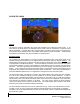
If APTSIGNS is selected, a “sign post” along with a representation of the runways will be plotted on the
SVS display for nearby airports that are contained in the G1000 airport database. The signpost will
become visible when you are within approximately 15nm of the airport. The text identifier for the airport
will be displayed inside the airport sign when the airplane reaches approximately 8 nm from the airport.
Once the airplane reaches approximately 4.5 nm from the airport, the airport sign will be removed but the
runways presentation will remain. If an approach to a specific runway has been loaded and activated,
that runway will be highlighted on the SVS display.
When on an approach, the highlight for the approach runway will be considerably larger than “normal” to
assist in visually acquiring the runway. The oversized highlight will automatically shrink around the
runway depiction so that the runway is proportionally displayed when the airplane is within approximately
½ nm of the threshold. Runway highlighting is displayed even if APTSIGNS are turned off.