
FAA Approved Airplane Flight Manual Supplement



190-00915-02 Rev. 7 Hawker Beechcraft 200, 200C, B200 , B200C,
B200GT and B200CGT King Air
Page 157 of 179
Pathway
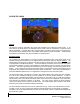
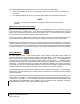
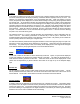
If PATHWAY is enabled on the SVS menu of the PFD and a defined navigation path has been entered on
the G1000, the SVS system will display a pathway, sometimes called a “highway in the sky” or HITS. The
pathway is a perspective representation of the programmed flight path. When the airplane is well off
course, the pathway will be displayed as a number boxes floating in the sky along the programmed lateral
and vertical path. As the airplane intercepts the programmed flight path, the number of boxes displayed
will be reduced to a maximum of four to avoid cluttering the PFD display. The pathway is only displayed for
navigation paths that are fully defined by the sensor in use. Because a fully defined lateral and vertical
path through space is not defined by them, a Pathway is not displayed for heading legs, VOR, LOC, BC or
ADF segments. When the Pathway is displayed, the color of the boxes indicates the sensor generating
the path. If the GPS sensor is in use, the boxes will be magenta colored. If the LOC sensor is defining
the path in use, the boxes will be green.
The Pathway boxes are +- 100 ft in vertical dimension and approximately +-380 ft horizontally from the
center of the box. The Pathway presentation is intended only to aid the pilot in awareness of the
programmed flight path location relative to the airplane’s current position. The pathway is not intended for
use as a primary reference in tracking the navigation path.
If a GPS based descent profile has been programmed either on the G1000 flight plan page or as part of an
approach or STAR, the descent will be displayed by the Pathway. Climb paths are never displayed by
the Pathway. If a profile requires a climb, the Pathway will be displayed as a level segment at the higher
of the altitude defined by the programmed path or the G1000 altitude selector.
Traffic
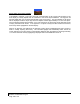
If traffic that is within the SVS field of view is detected by the G1000 system, a symbol will be displayed
on the PFD indicating the direction and relative altitude of the traffic. The traffic will be displayed as a
white diamond unless it generates a traffic alert. Traffic that causes an alert will be displayed as a solid
yellow circle accompanied by a yellow TRAFFIC annunciator to the right of top of the airspeed display
tape.
Horizon line
The SVS display includes an always visible white horizon line that represents the true horizon. Terrain
will be presented behind the horizon line, and terrain shown above the horizon line is above the current
aircraft altitude. Terrain that is shown below the horizon line is below the aircraft altitude.
Horizon Heading
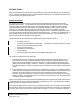
A heading scale may be displayed on the PFD horizon line, if selected by the pilot. The heading marks
are spaced in even 30 degree increments and are presented just above the horizon line with tic marks that
intersect the horizon line. The horizon heading will correspond to that presented by the HSI. Because
the horizon heading is only displayed in 30 degree increments, it should only be used for general heading
awareness and not be used to establish the aircraft heading.