
Cockpit Reference Guide

Garmin G1000 Cockpit Reference Guide for the Beechcraft 200/B200 Series
190-00929-04 Rev. A
44
Hazard Avoidance
Flight
Instruments
Nav/Com/
XPDR/AudioAFCSGPS Nav
Flight
PlanningProcedures
Hazard
Avoidance
Additional
FeaturesAnnun/AlertsAppendixIndex
3)
Select the available softkeys to select the desired SiriusXM weather product.
4)
Select the LEGEND Softkey to view the legends for the selected products.
If necessary, turn either FMS Knob to scroll through the list. Press the small
FMS Knob or the ENT Key to return to the map.
Map Panning Information – Weather Data Link Page
1)
Push in the Joystick to display the panning arrow.
2)
Move the Joystick to place the panning arrow on AIRMETs, TFRs, METARs,
SIGMETs, PIREPs or AIREPs.
3)
Press the ENT Key to display pertinent information for the selected product.
Note that pressing the ENT Key when panning over an AIRMET or a
SIGMET displays an information box that shows the text of the report.
Panning over an airport with METAR information does not display more
information but allows the user to press the ENT Key and select that
Airport’s Information Page to display the text of the report. Pressing the
ENT Key when panning over a TFR displays TFR specific information.
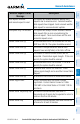
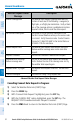
SiriusXM Weather Products and Symbols
Weather Product Symbol
Expiration Time
(Minutes)
Refresh Rate
(Minutes)
Next-generation Radar
(NEXRAD)
30
5 (U.S.)
10 (Canada)
Cloud Top 60 15
Echo Top 30 7.5
SiriusXM Lightning 30 5
Cell Movement 30 12
SIGMETs/AIRMETs 60 12