
Pilot's Guide





190-00663-03 Rev. A
Garmin G1000 Pilot’s Guide for the Beechcraft C90A/GT/GTi
87
FLIGHT INSTRUMENTS
Setting the barometric Minimum Descent Altitude/Decision Height and bug:
1) Press the
TMR/REF
Softkey.
2) Turn the large FMS Knob to highlight the Minimums field.
3) Turn the small FMS Knob to select BARO or TEMP COMP. OFF is selected by default. Press the ENT Key or turn
the large FMS Knob to highlight the next field.
4) Use the small FMS Knob to enter the desired altitude (from zero to 16,000 feet).
5) If TEMP COMP was selected, press the ENT Key or turn the large FMS Knob to highlight the next field and then
enter the temperature (-59˚C to 59˚C)
6) To remove the window, press the
CLR
Key or the
TMR/REF
Softkey.
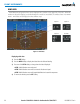
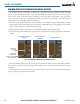
Figure 2-50 BARO and TEMP COMP MDA/DH
NOTE: The temperature at the destination can be entered in the Timer/References Window on the PFD,
or the Temperature Compensation Window on the MFD. There is only one compensation temperature
for the system, therefore, changing the temperature will affect both the loaded approach altitudes and
the minimums. Refer to the Flight Management section for information about applying temperature
compensation to approach altitudes.