
Pilot's Guide





Garmin G1000 Pilot’s Guide for the Beechcraft C90A/GT/GTi
190-00663-03 Rev. A82
FLIGHT INSTRUMENTS
2.3 PFD ANNUNCIATIONS AND ALERTING FUNCTIONS
The following annunciations and alerting functions are displayed on the PFD. Refer to Appendix A for more
information on alerts and annunciations.
G1000 ALERTING SYSTEM
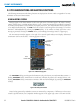
Messages appear in the Alerts Window (in the lower right corner of the PFD; Figure 2-39) when a warning,
caution, advisory alert, or G1000 message advisory occurs. System alert messages are provided for awareness
of G1000 system problems or status and may not require pilot action. The Alerts Window allows system alerts
to be displayed simultaneously. The FMS Knob can be used to scroll through the alert messages. The Alerts
Window is enabled/disabled by selecting the
ALERTS
Softkey. If the window is already open when a new
message is generated, selecting the ALERTS Softkey to acknowledge the message causes it to appear gray.
The Annunciation Window appears to the right of the Vertical Speed Indicator and displays abbreviated
annunciation text for aircraft alerts. A warning appears in red text.
Alerts
Window
Softkey
Annunciation
Reversionary
Sensor
Window
Comparator
Window
Figure 2-39 G1000 Alerting System
Annunciation
Window
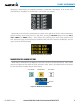
The ADVISORY Softkey provides general information to the pilot that may not need immediate attention. A
flashing ADVISORY Softkey annunciation (no audio tone) indicates the presence of a message advisory. The
flashing ADVISORY Softkey annunciation continues to flash until acknowledged (by pressing the
ADVISORY
Softkey).
Figure 2-40 Softkey Annunciation
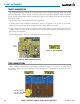
Critical values generated by redundant sensors are monitored by comparators. If differences in the sensors
exceed a specified amount, the Comparator Window appears in the upper right corner of the PFD and the