
Pilot's Guide





Garmin G1000 Pilot’s Guide for the Beechcraft C90A/GT/GTi
190-00663-03 Rev. A72
FLIGHT INSTRUMENTS
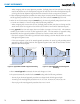
Changing navigation sources:
1) Select the CDI Softkey to change from GPS to VOR1 or LOC1. This places the cyan tuning box over the NAV1
standby frequency in the upper left corner of the PFD.
2) Select the CDI Softkey again to change from VOR1 or LOC1 to VOR2 or LOC2. This places the cyan tuning box
over the NAV2 standby frequency.
3) Select the CDI Softkey a third time to return to GPS.
Selecting the
CDI
Softkey
Cycles through
Navigation Sources
GPS
Selected
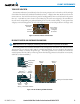
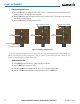
Figure 2-27 Selecting a Navigation Source
LOC1
Selected
NAV1 Selected for Tuning
VOR2
Selected
NAV2 Selected for Tuning
If the same VOR/LOC navigation source is selected on both PFDs, the navigation source annunciation turns
yellow on both displays (unless synchronized). Once the CDIs are synchronized (CDI SYNC turned on), they
remain synchronized until the setting is turned off.
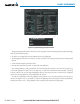
Synchronizing the CDIs:
1) Use the
FMS
Knob to select the AUX - System Setup Page on the MFD.
2) Press the
FMS
Knob to activate the cursor.
3) Turn the
large FMS
Knob to highlight the CDI ‘ON’ or ‘OFF’ in the Synchronization box.
4) Turn the
small FMS
Knob to highlight the desired setting, then press the FMS Knob.