
Pilot's Guide





190-00663-03 Rev. A
Garmin G1000 Pilot’s Guide for the Beechcraft C90A/GT/GTi
63
FLIGHT INSTRUMENTS
If the barometric altimeter settings differ between PFDs, the readouts become yellow. The system provides
a barometric settings synchronization feature on the AUX - System Setup Page. If synchronization is enabled
(BARO SYNC turned on), the settings remain synchronized until the setting is turned off.
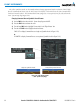
Enabling/disabling synchronization of the altimeter barometric pressure setting:
1) Use the
FMS
Knob to select the AUX - System Setup Page on the MFD.
2) Press the
FMS
Knob to activate the cursor.
3) Turn the
large FMS
Knob to highlight the ‘ON’ or ‘OFF’ field in the SYNCHRONIZATION box.
4) Turn the
small FMS
Knob to highlight the desired setting, then press the FMS Knob.
Figure 2-13 System Setup Page, Barometric Pressure Synchronization
Barometric Settings
not Synchronized on PFD
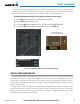
VERTICAL SPEED INDICATOR (VSI)
The Vertical Speed Indicator (VSI) displays the aircraft vertical speed using a non-moving tape labeled at 2000
and 4000 fpm with minor tick marks every 1000 fpm. The current vertical speed is displayed in the pointer
along the tape. Digits appear in the pointer when the climb or descent rate is greater than 100 fpm. If the rate
of ascent/descent exceeds 4000 fpm, the pointer appears at the corresponding edge of the tape and the rate
appears inside the pointer.
A magenta chevron bug is displayed as the Required Vertical Speed Indication (RVSI) for reaching a VNV
Target Altitude once the “TOD [Top of Descent] within 1 minute” alert has been generated. See the Flight
Management Section for details on VNV features, and refer to Section 2.2, Supplemental Flight Data, for more
information about VNV indications on the PFD.