
Pilot's Guide





190-00663-03 Rev. A
Garmin G1000 Pilot’s Guide for the Beechcraft C90A/GT/GTi
57
FLIGHT INSTRUMENTS
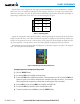
Vspeed values can be changed and their bugs turned enabled/disabled on the Timer/References Window.
When active (on), the Vspeeds are displayed at their respective locations to the right of the airspeed scale.
When the system power is cycled, the system restores the default Vspeed values, and disables the display of
Vspeed bugs. Default values for V
R
and V
50
are zero until changed by the pilot.
Vspeed Bug
Takeoff
V
R
R
V
50
50
Landing
V
REF
RF
Table 2-1 Vspeed Bug Labels
Vspeeds are categorized as either takeoff or landing. Takeoff Vspeed bugs are automatically turned off when
airspeed reaches 160 knots. The order in which the categories are displayed is determined by whether the
aircraft is on the ground or in the air. If the aircraft is on the ground, the takeoff Vspeeds are displayed at the
top of the Vspeed list. If the aircraft is in the air, the landing Vspeeds are displayed at the top of the list.
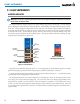
The maximum speed with approach flaps is displayed as a solid white triangle to the right of the airspeed
scale. This indication cannot be disabled.
Figure 2-5 Maximum Flaps Extended Speed Reference
Changing Vspeeds and turning Vspeed bugs on/off:
1) Select the
TMR/REF
Softkey.
2) Turn the
large FMS
Knob to highlight the desired Vspeed.
3) Turn the small FMS Knob to change the Vspeed value. If the Vspeed value is zero, the first click of the FMS Knob
adjusts the Vspeed to the minimum selectable value; subsequent clicks adjust the value in 1-kt increments
(when a speed has been changed from a default value, an asterisk appears next to the speed).
4) Press the
ENT
Key or turn the large FMS Knob to highlight the ON/OFF field
5) Turn the
small FMS
Knob clockwise to ON or counterclockwise to OFF.
6) To remove the window, press the
CLR
Key or select the
TMR/REF
Softkey.