
Pilot's Guide




Garmin G1000 Pilot’s Guide for the Beechcraft C90A/GT/GTi
190-00663-03 Rev. A572
APPENDIX B
Loading a standby navigation database:
1) With the system OFF, insert the SD card containing the new navigation database version into the top card slot
of the MFD.
2) Verify that an SD card is inserted in the bottom slot of each PFD and the MFD.
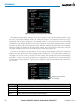
3) Turn the system ON. A prompt similar to the following is displayed.
Figure B-3 Standby Navigation Database Prompt
4) Press the YES Softkey. The navigation database is copied to the SD card in the bottom card slot of the MFD.
5) After the navigation database files are copied to the bottom SD card, the display will appear as shown in Figure
B-4.
Figure B-4 Standby Navigation Database Update Complete
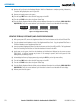
6) As instructed on the display, press any key to continue. The display will now appear as shown in Figure B-5.
Figure B-5 Navigation Database Verification Prompt