
Pilot's Guide




Garmin G1000 Pilot’s Guide for the Beechcraft C90A/GT/GTi
190-00663-03 Rev. A540
ADDITIONAL FEATURES
UNUSUAL ATTITUDES
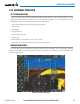
Unusual attitudes are displayed with red chevrons overlaid on the display indicating the direction to fly to
correct the unusual attitude condition. The display shows either a brown or blue colored bar at the top or
bottom of the screen to represent earth or sky. This is intended to prevent losing sight of the horizon during
extreme pitch attitudes.
Figure 8-89 Unusual Attitude Display
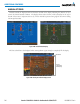
The blue colored bar is also displayed when terrain gradient is great enough to completely fill the display.
Blue Band
Figure 8-90 Blue Sky Bar with Full Display Terrain
Terrain
Completely
Fills Display