
Pilot's Guide




Garmin G1000 Pilot’s Guide for the Beechcraft C90A/GT/GTi
190-00663-03 Rev. A 527
ADDITIONAL FEATURES
6) Select the LOCK Softkey.
7) Turn the large FMS Knob to highlight YES.
8) To complete activation, press the ENT Key.
RADIO
and
INFO
Softkeys
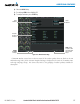
Figure 8-75 XM Information Page
Audio
Radio ID
Weather
Products
Window
Data
Radio ID
LOCK
Softkey
is Used to Save
Activation Data
During Initial
Setup
If SiriusXM Weather services have not been activated, all the weather product boxes are blank on the XM
Information Page and a yellow Activation Required message is displayed in the center of the Weather Data
Link Page (Map Page Group). The Service Class refers to the groupings of weather products available for
subscription.