
Pilot's Guide






190-00663-03 Rev. A
Garmin G1000 Pilot’s Guide for the Beechcraft C90A/GT/GTi
37
SYSTEM OVERVIEW
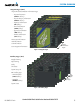
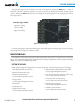
The Procedure pages may be accessed at any time on the MFD by pressing the PROC Key. A menu is
initialized, and when a departure, approach, or arrival is selected, the appropriate Procedure Loading Page is
opened. Turning the FMS Knob does not scroll through the Procedure pages (note the single page icon in the
lower right corner).
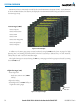
Figure 1-32 Procedure Pages
Procedure Pages (PROC)
Departure Loading
Arrival Loading
Approach Loading
For some of these pages (Airport Information pages, XM Satellite pages, Procedure pages), the title of the page
may change while the page icon remains the same.
MFD SYSTEM PAGES
In the Auxiliary (AUX) Page Group, there are three system pages: System Setup 1, System Setup 2, and System
Status. The System Setup pages allows management of various system parameters, while the System Status Page
displays the status of all G1000 system LRUs.
SYSTEM SETUP PAGE
G1000 system settings are managed from the System Setup Page. The following settings can be changed:
• Time display format (local or UTC )
• Displayed measurement units
• Barometric Transition Alert
(see the Flight Instruments Section)
• Airspace alerts
(see the Flight Management Section)
• Arrival alert
• Audio alert voice
• Flight Director Format
(see the Flight Instruments Section)
• MFD Data Bar (Navigation Status Box) fields
(see the Flight Management Section)
• GPS Course Deviation Indicator (CDI) range
(see the Flight Instruments Section)
• COM transceiver channel spacing
(see the Audio Panel and CNS Section)
• Displayed nearest airports
(see the Flight Management Section)
• CDI/Baro Synchronization
(see the Flight Instruments Section)