
Pilot's Guide





190-00663-03 Rev. A
Garmin G1000 Pilot’s Guide for the Beechcraft C90A/GT/GTi
443
AUTOMATIC FLIGHT CONTROL SYSTEM
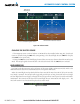
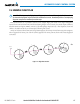
Figure 7-34 Backcourse Mode
Backcourse
Mode Active
LOC2 is Selected Navigation Source
Command Bars Hold Pitch Attitude
CHANGING THE SELECTED COURSE
If the navigation source is VOR or localizer or OBS Mode has been enabled when using GPS, the Selected
Course is controlled using the CRS Knob corresponding to the selected flight director (CRS1 for the pilot
side, CRS2 for the copilot side).
Pressing the CWS Button and hand-flying the aircraft does not reset any reference data while in Backcourse
Mode. The autopilot guides the aircraft back to the Selected Course when the CWS Button is released.
LEVEL MODE (LVL)
Level (LVL) mode becomes active only as a function of Electronic Stability and Protection (ESP). Refer to the
Additional Features section for a detailed discussion of the optional ESP feature.
When the normal flight envelope thresholds have been exceeded for more than 50% of the last 20 seconds,
Level mode is activated. The autopilot will engage and provide input to bring the aircraft back into straight
and level flight based on zero degrees roll angle and zero feet per minute vertical speed. An aural “ENGAGING
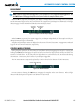
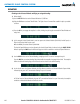
AUTOPILOT” alert sounds and the lateral and vertical flight director annunciations will display “LVL”. The
AFCS will remain in Level mode until the pilot selects another mode.
Figure 7-35 Level Mode