
Pilot's Guide




Garmin G1000 Pilot’s Guide for the Beechcraft C90A/GT/GTi
190-00663-03 Rev. A
434
AUTOMATIC FLIGHT CONTROL SYSTEM
TAKEOFF (TO) AND GO AROUND (GA) MODES
Go Around and Takeoff modes are coupled pitch and roll modes and are annunciated as both the vertical and
lateral modes when active. In these modes, the flight director commands a constant set pitch attitude and keeps
the wings level. The
GA Button
is used to select both modes. The mode entered by the flight director depends
on whether the aircraft is on the ground.
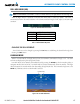
Takeoff Mode provides an attitude reference during rotation and takeoff. This mode can be selected only
while on the ground by pushing the GA Button. The flight director Command Bars assume a wings-level,
pitch-up (8.6°) attitude.
Pressing the GA Button while in the air activates the flight director in a wings-level, pitch-up attitude, allowing
the execution of a missed approach or a go around. Unless the Underspeed Protection option is installed, Go
Around Mode disengages the autopilot and arms Selected Altitude Capture Mode automatically. Subsequent
autopilot engagement is allowed. Attempts to modify the aircraft attitude (i.e., with the
NOSE UP/DN
Wheel
or
CWS
Button) result in reversion to Pitch and Roll Hold modes.
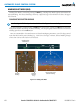
Figure 7-26 Takeoff and Go Around Modes
Command Bars Indicate Climb
Takeoff Mode Active
Go Around
Mode Active