
Pilot's Guide






190-00663-03 Rev. A
Garmin G1000 Pilot’s Guide for the Beechcraft C90A/GT/GTi
407
HAZARD AVOIDANCE
The Navigation Map Page Setup Menu also controls the display of traffic. The setup menu controls the map
range settings. Traffic data symbols and labels can be decluttered from the display. If a map range larger than
the map range setting is selected, the data is removed from the map. Maps besides the Traffic Map Page use
settings based on those selected for the Navigation Map Page.
TAS ALERTS
NOTE: Refer to the KTA 870 documentation for information on alerts generated by the TAS equipment.
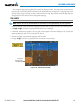
When the number of TAs on the Traffic Map Page increases from one scan to the next, the following occur:
• A “Traffic, Traffic” voice alert is generated when the first TA is displayed.
• A TRAFFIC Annunciation appears at the top right of the airspeed on the PFD, flashing for five seconds and
remaining displayed until no TAs are detected in the area.
• The PFD Inset Map is automatically displayed with TA traffic.
• A single “Traffic” voice alert is generated when the number of TAs increases.
Figure 6-118 Traffic Annunciation (PFD)
Inset Map
Displays When
TA is Detected