
Pilot's Guide




Garmin G1000 Pilot’s Guide for the Beechcraft C90A/GT/GTi
190-00663-03 Rev. A396
HAZARD AVOIDANCE
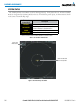
Figure 6-108 TAS Traffic on the Navigation Map Page
“Non-Bearing”
Traffic Advisory
Traffic Advisory
Off-Scale
Non-Threat
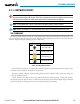
Traffic, 2500’
Above,
Descending
Traffic Advisory,
500’ Below,
Climbing
Proximity Traffic,
900’ Above,
Level
Non-Threat
Traffic, Altitude
Not Available
Traffic Display
Enabled Icon
Displaying traffic information (PFD Inset Map):
1) Select the INSET Softkey.
2) Select the TRAFFIC Softkey to display traffic data on the inset map (TRFC-1).
3) Select the softkey again to display the traffic-only inset (TRFC-2).
4) Select the softkey again to remove traffic data.
The Navigation Map Page Setup Menu also controls the display of traffic. The setup menu controls the map
range settings. Traffic data symbols and labels can be decluttered from the display. If a map range larger than
the map range setting is selected, the data is removed from the map. Maps besides the Traffic Map Page use
settings based on those selected for the Navigation Map Page.