
Pilot's Guide




190-00663-03 Rev. A
Garmin G1000 Pilot’s Guide for the Beechcraft C90A/GT/GTi
395
HAZARD AVOIDANCE
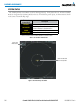
Figure 6-107 Traffic Map Page
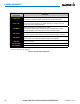
Operating
Mode
Altitude
Mode
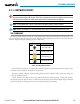
Traffic Advisory,
Aircraft is
500’ Below,
Climbing
Off Scale Traffic
Advisory, 400’
Below, No
Vertical Trend
“No Bearing”
Traffic (Bearing
Undetermined),
Distance 4.0
nm, 500’ Above,
Descending
Proximity
Traffic, 900’
Above, No
Vertical Trend
Traffic Display
Range Rings
Non-Threat
Traffic, 2500’
Above,
Descending
Non-Threat Traffic,
Altitude Not
Reported
The Map - Traffic Map Page shows surrounding TAS traffic data in relation to the aircraft’s current position
and altitude, without basemap clutter. It is the principal map page for viewing traffic information. Aircraft
orientation is always heading up unless there is no valid heading. Map range is adjustable with the Joystick,
as indicated by the map range rings.
The traffic mode and altitude display mode are annunciated in the upper left corner.
Displaying traffic information (maps other than the Traffic Map Page):
1) Select the MAP Softkey.
2) Select the TRAFFIC Softkey. Traffic is now displayed on the map.
When traffic is selected on maps other than the Traffic Map Page, a traffic icon is shown to indicate TAS is
enabled for display.