
Pilot's Guide




Garmin G1000 Pilot’s Guide for the Beechcraft C90A/GT/GTi
190-00663-03 Rev. A380
HAZARD AVOIDANCE
6.5 PROFILE VIEW TERRAIN
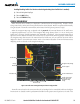
The G1000 offers a Profile View of terrain and obstacles relative to the aircraft’s current flight path and altitude
on the Navigation Map Page of the MFD. The Profile View feature is not part of the TAWS system discussed
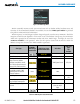
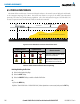
previously, and it does not provide alerting capabilities. The colors and symbols in Figure 6-95 and Table 6-16
are used to represent terrain and obstacles inside the Profile View Window.
1000 ft
Aircraft Altitude
100 ft Threshold
Terrain Above Aircraft Altitude
Red terrain is above
or within 100 ft below
the aircraft altitude
Yellow terrain is between 100 ft and 1000 ft below the aircraft altitude
Black terrain is more than 1000 ft below the aircraft altitude
Figure 6-95 Terrain Altitude/Color Correlation for Profile View Terrain
Unlighted Obstacle Lighted Obstacle
Obstacle Location
< 1000’ AGL > 1000’ AGL < 1000’ AGL > 1000’ AGL
Red obstacle is above or within 100 ft
below the aircraft altitude
Yellow obstacle is between 100 ft and
1000 ft below the aircraft altitude
Table 6-16 Profile View Terrain/Obstacle Colors and Symbology
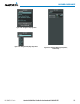
Enabling/Disabling Profile View:
1) Select the Navigation Map Page.
2) Select the MAP Softkey.
3) Select the PROFILE Softkey to enable or disable Profile View.
Or:
a) Press the MENU Key.
b) Select ‘Show Profile View’ or ‘Hide Profile View’ (choice dependent on current state) and press the ENT Key.