
Pilot's Guide





Garmin G1000 Pilot’s Guide for the Beechcraft C90A/GT/GTi
190-00663-03 Rev. A362
HAZARD AVOIDANCE
SETTING UP STORMSCOPE ON THE NAVIGATION MAP
Setting up Stormscope options on the Navigation Map:
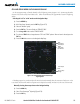
1) On the Navigation Map Page, press the MENU Key.
2) With ‘Map Setup’ selected (Figure 6-73), press the ENT Key.
3) Turn the small FMS Knob to display the group selection window. Turn the small FMS Knob to select ‘Weather’,
and press the ENT Key.
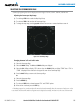
4) Turn the large FMS Knob to highlight and move between the product selections (Figure 6-74).
5) When an item is highlighted, turn the small FMS Knob to select the option.
6) Press the ENT Key.
7) Press the
FMS
Knob to return to the Navigation Map Page (Figure 6-75).
The following options are available (Figure 6-74):
• STRMSCP LTNG – Turns the display of Stormscope data on or off.
• STRMSCP MODE – Selects the CELL or STRIKE mode of lightning activity. Cell mode identifies clusters
or cells of electrical activity. Strike mode indicates the approximate location of lightning strikes.
• STRMSCP SMBL – Selects the range at which Stormscope data displays. Stormscope data is removed
when a map range greater than the STRMSCP SMBL value is selected.
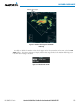
Figure 6-73 Navigation Map Page Menu
Figure 6-74 Map Setup Menu