
Pilot's Guide





Garmin G1000 Pilot’s Guide for the Beechcraft C90A/GT/GTi
190-00663-03 Rev. A358
HAZARD AVOIDANCE
return intensity. The more energy that dissipates, the lesser the displayed intensity of the return. Accuracy
of the displayed intensity of returns located in the shaded areas are suspect. Make maneuvering decisions
with this information in mind. Proper antenna tilt management should still be employed to determine the
extent of attenuation in a shaded area.
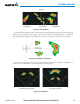
To activate or deactivate the WATCH™ feature, select the WATCH Softkey.
Horizontal Scan With WATCH™Horizontal Scan Without WATCH™
Areas of
Attenuated Signal
Displayed intensity is questionable.
Potentially stronger than displayed.
Figure 6-70 Horizontal Scan Without and With WATCH™
WeAtHeR AleRt
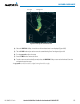
The Weather Alert feature indicates the presence of heavy precipitation between the ranges of 80 and 320
nm regardless of the currently displayed range. Weather Alert targets appear as red bands along the outer
range ring at the approximate azimuth of the detected returns.
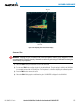
If a Weather Alert is detected within ±10° of the aircraft heading, and the WX ALRT Softkey is enabled
on the Weather Radar Page, the system also displays an alert on the PFD in the Alerts Window.
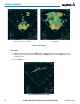
If the antenna tilt is adjusted too low, a weather alert can be generated by ground returns. To avoid
unwanted weather alerts, deselect the WX ALRT Softkey.