
Pilot's Guide





190-00663-03 Rev. A
Garmin G1000 Pilot’s Guide for the Beechcraft C90A/GT/GTi
353
HAZARD AVOIDANCE
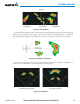
Figure 6-64 Bearing Line on Horizontal Scan
Bearing Line
Scan Line
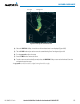
4) Select the
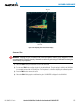
VERTICAL Softkey. A vertical scan of the selected area is now displayed (Figure 6-65).
5) The small
FMS Knob may be used to move the scanned bearing line a few degrees right or left.
6) Turn the Joystick to adjust the range.
7) Press the FMS Knob to remove the cursor.
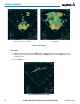
8) To select a new area to be vertically scanned, select the HORIZON Softkey to return to the Horizontal Scan view
and repeat the previous steps.
The Joystick can also be used to adjust bearing from left to right.