
Pilot's Guide





Garmin G1000 Pilot’s Guide for the Beechcraft C90A/GT/GTi
190-00663-03 Rev. A352
HAZARD AVOIDANCE
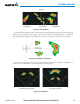
Figure 6-63 Confirming Activating Radar
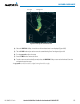
b) Turn the small FMS Knob to highlight YES and press the ENT Key to continue radar activation.
Or:
If the aircraft is airborne, select the WEATHER Softkey. The radar begins transmitting.
4) Turn the Joystick to select the desired map range.
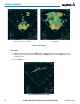
5) The horizontal scan is initially displayed (Figure 6-62). If desired, select the VERTICAL Softkey to change to
vertical scanning.
Vertically scanning a storm cell:
NOTE: Vertical scanning of a storm cell should be done with the aircraft wings level to avoid constant
adjustment of the Bearing Line.
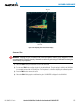
1) While in the Horizontal Scan view, select the BRG Softkey. This places the cursor in the BEARING field and
displays the Bearing Line.
If the Bearing Line is not displayed, press the MENU Key and turn the large
FMS Knob to select Show Bearing
Line. Press the ENT Key.
2) Press the ENT Key.
3) Turn the small
FMS Knob to place the Bearing Line on the desired storm cell or other area to be vertically
scanned.