
Pilot's Guide





190-00663-03 Rev. A
Garmin G1000 Pilot’s Guide for the Beechcraft C90A/GT/GTi
329
HAZARD AVOIDANCE
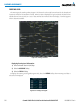
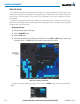
Figure 6-27 Surface Analysis Data - 24-Hour
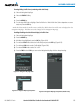
Displaying Surface Analysis and City Forecast information:
1) Select the Weather Data Link (XM) Page.
2) Select the MORE WX Softkey.
3) Select the SFC Softkey.
4) Select the desired forecast time: CURRENT, 12 HR, 24 HR, 36 HR, or 48 HR. The SFC Softkey label changes
to reflect the forecast time selected.
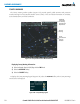
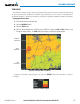
To display the Surface Analysis and City Forecast legend (Figure 6-28), select the
LEGEND
Softkey when
Surface Analysis and City Forecast are selected to be displayed.
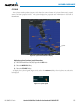
Figure 6-28 Surface Analysis Legend