
Pilot's Guide



190-00663-03 Rev. A
Garmin G1000 Pilot’s Guide for the Beechcraft C90A/GT/GTi
321
HAZARD AVOIDANCE
ECHO TOPS
NOTE: Echo Tops cannot be displayed at the same time as Cloud Tops or NEXRAD data is displayed.
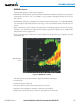
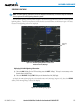
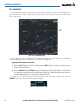
The Echo Tops weather product (Figure 6-14) shows the location, elevation, and direction of the highest
radar echo. The highest radar echo does not indicate the top of a storm or clouds; rather it indicates the
highest altitude at which precipitation is detected. Information is derived from NEXRAD data.
Figure 6-14 Echo Tops Weather Product on the Weather Data Link (XM) Page
Displaying Echo Tops information:
1) Select the Weather Data Link (XM) Page.
2) Select the ECHO TOPS Softkey.
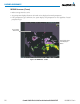
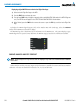
To display the Echo Tops legend (Figure 6-15), select the
LEGEND
Softkey when Echo Tops is selected for
display. Since Echo Tops and Cloud Tops use the same color scaling to represent altitude, display of these
weather products is mutually exclusive. When Echo Tops is activated, NEXRAD and Cloud Tops data are
removed.
Figure 6-15 Echo Tops Legend
No Radar Coverage