
Pilot's Guide




Garmin G1000 Pilot’s Guide for the Beechcraft C90A/GT/GTi
190-00663-03 Rev. A316
HAZARD AVOIDANCE
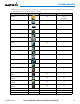
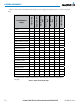
Each active weather product has an associated legend which can be displayed on the Weather Data Link (XM)
Page.
Viewing legends for displayed weather products
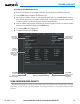
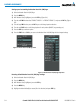
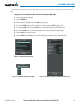
1) Select the Weather Data Link (XM) Page.
2) Select the LEGEND Softkey to display the legends for the displayed weather products.
Or:
a) Press the MENU Key.
b) Select ‘Weather Legend’ and press the ENT Key.
3) Turn the FMS Knob to scroll through the legends if more are available than fit in the window.
4) To remove the Legend Window, select the LEGEND Softkey, the ENT or the CLR Key, or press the FMS Knob.
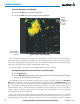
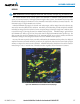
Additional information about the following can be displayed by panning over the display on the map:
• Echo Tops
• Cloud Tops
• Cell Movement
• SIGMETs
• AIRMETs
• METARs
• County Warnings
• TFRs
• AIREPs
• PIREPs
The map panning feature is enabled by pressing the Joystick. The map range is adjusted by turning the
Joystick. If the map range is adjusted while panning is enabled, the map is re-centered on the Map Pointer.
Figure 6-9 Panning on the Weather Data Link (XM) Page
Additional
Information
on Weather
Feature
Selected with
Map Pointer
Severe
Thunderstorm
Warning Selected
with Map Pointer