
Pilot's Guide




Garmin G1000 Pilot’s Guide for the Beechcraft C90A/GT/GTi
190-00663-03 Rev. A310
HAZARD AVOIDANCE
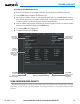
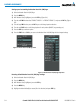
Viewing the Weather Data Link (XM) Page:
1) Turn the large
FMS
Knob to select the Map Page Group.
2) Turn the small
FMS
Knob
to select the Weather Data Link (XM) Page.
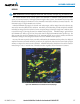
NEXRAD
Weather
Product Icon
and Age
(U.S. and
Canada)
NEXRAD Weather
Product Selected
for Display
Figure 6-2 Weather Data Link (XM) Page
For each enabled SiriusXM Weather product, the system displays a weather product icon and product age.
The product age is the elapsed time (in minutes) since the weather data provider compiled the weather product.
The product age display does not indicate the age of the information contained within the weather product,
which can be significantly older than the displayed weather product age.
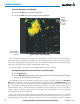
The weather product icon and age may be enabled/disabled on the PFD Inset Map.
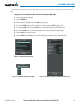
Enabling/Disabling Weather Product Information on the PFD Inset Map:
1) Press the INSET Softkey.
2) Press the WX LGND Softkey to display or remove weather product info and age data when a data link weather
product is selected for display on the PFD Inset Map.
The SiriusXM Weather service broadcasts weather products at specific intervals (defined in the Broadcast
Rate column in Table 6-1). If for any reason, a product is not refreshed within the Broadcast Rate intervals
(see Table 6-1), the system removes the expired data from the display, and shows dashes instead of the product
age. This ensures the displayed information is consistent with what is currently being transmitted by the
SiriusXM Weather service. If more than half of the expiration time has elapsed, the color of the product age
changes to yellow. If data for a weather product is not available, the system displays ‘N/A’ next to the weather
product symbol instead of the product age.
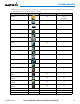
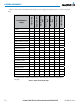
Table 6-1 shows the weather product symbols, the expiration times and the broadcast rates. The broadcast
rate represents the interval at which the SiriusXM Weather service transmits new signals that may or may not
contain updated weather products. It does not represent the rate at which the weather information is updated