
Pilot's Guide



Garmin G1000 Pilot’s Guide for the Beechcraft C90A/GT/GTi
190-00663-03 Rev. A240
FLIGHT MANAGEMENT
Removing a user-defined hold at an off-route direct-to:
1) Press a Direct To Key to display the DIRECT TO Window (PFD or MFD).
2) Press the MENU Key to display the PAGE MENU with the cursor on the ‘Cancel Direct-To NAV’ selection.
3) Press the ENT Key. The holding pattern is removed.
Hold At
Present
Position
Menu
Selection
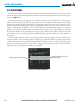
Figure 5-90 Creating a User Defined Holding Pattern at the Aircraft Present Position
Location of Hold
Expect Further Clearance Time
Leg Length Mode Button
(TIME or DIST))
Map of Hold Location
Course Direction
(INBOUND or OUTBOUND)
Leg Length
(Time in nm or Distance in minutes)
Hold Entry Course
Turn Direction
(RIGHT or LEFT)
Activate Hold