
Pilot's Guide




190-00663-03 Rev. A
Garmin G1000 Pilot’s Guide for the Beechcraft C90A/GT/GTi
203
FLIGHT MANAGEMENT
part of the active flight plan. All VNV altitudes following the direct-to waypoint are retained. See the section on
Vertical Navigation for more information regarding the use and purpose of VNV altitudes and offset distances.
Entering a VNV altitude and along-track offset for the waypoint:
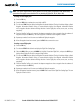
1) Press the Direct-to Key to display the Direct-to Window.
2) Turn the large FMS Knob to place the cursor over the ‘VNV’ altitude field.
3) Enter the desired altitude.
4) Press the ENT Key. The option to select MSL or AGL is now displayed.
5) Turn the small FMS Knob to select ‘MSL’ or ‘AGL’.
6) Press the ENT Key. The cursor is now flashing in the VNV offset distance field.
7) Enter the desired along-track distance before the waypoint.
8) Press the ENT Key. The ‘Activate?’ field is highlighted.
9) Press the ENT Key to activate.
Removing a VNV altitude constraint:
1) Press the Direct-to Key to display the Direct-to Window.
2) Press the MENU Key.
3) With ‘Clear Vertical Constraints’ highlighted, press the ENT Key.
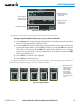
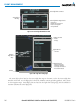
Figure 5-55 Direct-to Window - Clearing Vertical Constraints
Page Menu
- Clear Vertical Navigation
Constraints