
Pilot's Guide





190-00663-03 Rev. A
Garmin G1000 Pilot’s Guide for the Beechcraft C90A/GT/GTi
136
AUDIO PANEL AND CNS
CLEARANCE RECORDER AND PLAYER
NOTE: Pressing the Play Key on the pilot’s Audio Panel plays recorded audio to the Pilot. Pressing the Play
Key on the Copilot’s Audio Panel plays recorded audio to the Copilot.
The Audio Panel contains a digital clearance recorder that continually records up to 2.5 minutes of the
selected COM radio signal. Recorded COM audio is stored in separate memory blocks. Once 2.5 minutes of
recording time have been reached, the recorder begins recording over the stored memory blocks, starting from
the oldest block.
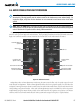
If a GMA 1347D audio panel is installed, pressing the REC Key enables recording of audio from the COM
radio selected for transmission. Quiet periods between COM reception are not recorded.
If a GMA 1347D-20 audio panel is installed, the audio recording function of the COM radio selected for
transmission is always enabled. Quiet periods between COM reception are not recorded.
The PLAY Key controls the play function. The PLAY annunciator remains lit to indicate when play is in
progress. The PLAY annunciator turns off after playback is finished.
Press the PLAY Key once to play the latest recorded memory block and then return to normal operation.
Press the PLAY Key again during play of a memory block to stop play. If a COM input signal is detected during
play of a recorded memory block, play is halted.
Press the PLAY Key twice within one-half second while audio is playing to play the previous block of recorded
audio. Each subsequent two presses of the PLAY Key within one-half second backtracks through the recorded
memory blocks to reach and play any recorded block.
Powering off the unit automatically clears all recorded blocks.
Figure 4-44 Clearance Recorder and Player Controls
PLAY
Key
Controls the
Play Function
GMA 1347D-20
PLAY
Key
Controls the
Play Function
GMA 1347D
REC
Key Enables
the Record
Function