
Pilot's Guide





190-009663-03 Rev. A
Garmin G1000 Pilot’s Guide for the Beechcraft C90A/GT/GTi
131
AUDIO PANEL AND CNS
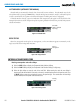
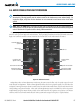
Entering a transponder code with the PFD FMS Knob:
1) Select the
XPDR
and the
CODE
Softkeys as in the previous procedure to enable code entry.
2) Turn the small FMS Knob to enter the first two code digits.
3) Turn the large FMS Knob to move the cursor to the next code field.
4) Enter the last two code digits with the small FMS Knob.
5) Press the
ENT
Key to complete code digit entry.
Pressing the CLR Key or small FMS Knob before code entry is complete cancels code entry and restores the
previous code. Waiting for 10 seconds after code entry is finished activates the code automatically.
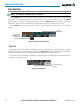
Figure 4-37 Entering a Code with the FMS Knob
Press the
ENT
Key
to Complete Code
Entry
Turn the Large
FMS
Knob to
Move the Cursor
to the Next
Code Field
Turn the Small
FMS
Knob to
Enter Two Code
Digits at a Time
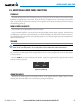
VFR CODE
Press the
XPDR
Softkey, then the
VFR
Softkey to display the pre-programmed VFR code in the code field of
the Transponder Data Box. Press the
VFR
Softkey again to restore the previous identification code.
The pre-programmed VFR Code is set at the factory to 1200. If a VFR code change is required, contact a
Garmin-authorized service center for configuration.
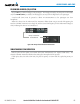
Figure 4-38 VFR Code
VFR Code